Artificial intelligence has quietly rewritten what photo editing means. Tasks that once took a skilled retoucher an hour, cutting out a subject, erasing a tourist from a landscape, doubling an image's resolution, or matching light across a composite, now happen in a single click. But with dozens of AI photo editing tools competing for attention in 2026, the hard part is no longer editing; it is choosing the right software for your budget and workflow.
This guide compares the ten best AI image editors available today. For each tool you will find a star rating, a plain-English feature list, exact pricing in US dollars, and an honest look at where it wins and where it falls short. Whether you are a professional retoucher, an e-commerce seller processing hundreds of product shots, a social creator, or someone who just wants a free tool that works in a browser, there is a pick here for you.
Note on pricing: all prices below are US list prices verified in mid-to-late 2026 and are shown for annual plans billed monthly unless stated otherwise. Vendors change prices and run promotions frequently, so always confirm the current figure on the official pricing page before you buy.
How we evaluated these AI photo editors
Every tool in this guide was scored against the same five criteria, weighted toward the things that actually matter in day-to-day editing:
• Editing quality — how natural and artefact-free the AI output looks, especially on upscaling, object removal and generative fill.
• Feature breadth — how many editing jobs the tool can handle without a second app.
• Ease of use — learning curve, interface clarity, and how fast a beginner can get a usable result.
• Value for money — what you get per dollar, including free tiers and one-time-purchase options.
• Platform & workflow fit — desktop, web and mobile availability, plus batch processing and plugin support.
Best AI photo editing tools at a glance
Short on time? This table summarises every pick, who it suits best, its rating, whether it has a free tier, and the entry price. Detailed reviews follow below.
| Tool | Best for | Rating | Free tier | Starting paid price |
| Adobe Photoshop | Pro compositing & generative editing | 4.8 | Trial only | $22.99/mo (or $19.99 Photography) |
| Topaz Photo AI | Upscaling, denoise & sharpening | 4.7 | Trial only | ~$21/mo (annual) |
| Adobe Lightroom | RAW workflow, color & cataloguing | 4.6 | Mobile free | $11.99/mo |
| Luminar Neo | AI landscape & portrait, one-time buy | 4.5 | Trial only | $119 one-time |
| Canva Magic Studio | All-in-one design + quick AI edits | 4.4 | Yes | ~$15/mo |
| Photoroom | E-commerce, product & batch editing | 4.4 | Yes | $12.99/mo |
| Picsart | Mobile & social content creators | 4.2 | Yes | ~$5/mo (annual) |
| Pixlr | Casual, quick browser edits | 4.1 | Yes | $7.99/mo |
| Fotor | Budget all-rounder | 4.0 | Yes | $8.99/mo |
| Photopea | Free Photoshop-style editor | 4.0 | Yes | $5/mo (ad-free) |
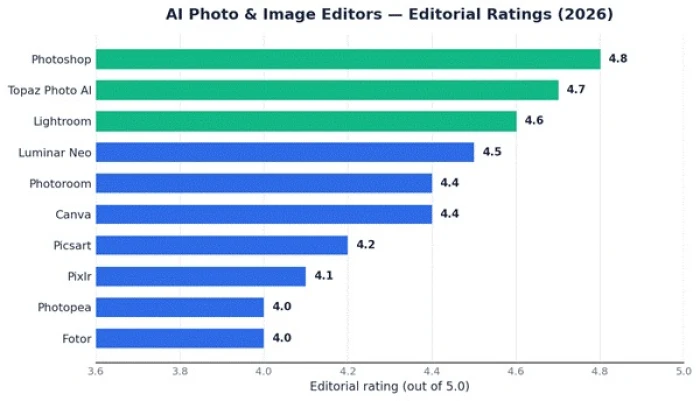
Figure 1 — Editorial ratings across the ten AI photo editors reviewed (out of 5.0).
1. Adobe Photoshop (with Firefly AI)
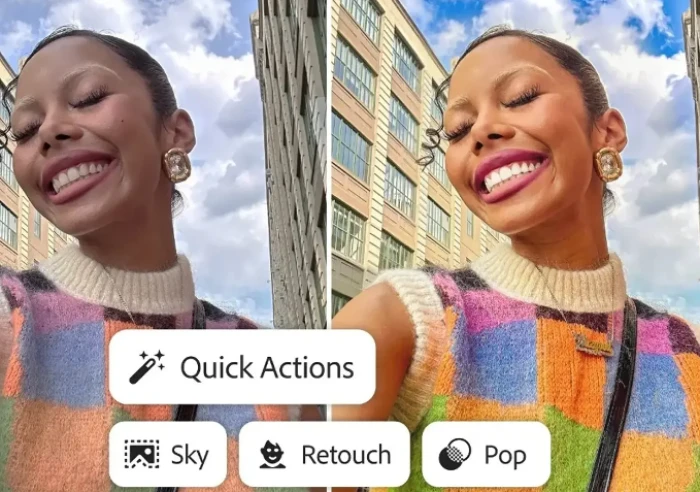
The industry standard, now supercharged by generative AI.
★★★★★ 4.8 / 5
Photoshop remains the most capable pixel editor on the planet, and the addition of Adobe's Firefly engine has turned it into a genuine AI powerhouse. Generative Fill lets you extend a background, add or remove objects, and repair damage by typing a short prompt or simply painting over an area. Generative Expand grows the canvas beyond the original frame, filling the new space convincingly.
It is overkill for someone who just wants to brighten a selfie, but for professional compositing, retouching and layered design work, nothing else offers the same depth or precision.
Key features
• Generative Fill and Generative Expand for prompt-based editing and canvas extension.
• Best-in-class layers, masking, selections and Smart Objects for non-destructive editing.
• One-click Remove tool and AI-powered Select Subject / Object Selection.
• Neural Filters for skin smoothing, colour transfer, depth and style changes.
• Runs on Windows, macOS, iPad and web, with cloud sync across devices.
Pricing
| Plan | Price (USD) | What you get |
| Photoshop (single app) | $22.99/mo | Photoshop on desktop, web, iPad; 100GB storage; 25 generative credits/mo |
| Photography plan | $19.99/mo | Photoshop + Lightroom + Lightroom Classic + 1TB storage (best value) |
| Firefly Pro | $19.99/mo | Unlimited standard AI + 4,000 premium credits for AI-heavy creators |
| Creative Cloud Pro | $69.99/mo | 20+ Adobe apps including Illustrator, Premiere Pro and InDesign |
Pros Unmatched editing precision and depth Firefly generative tools built right into the workflow Cross-device and plugin ecosystem | Cons Steep learning curve for beginners Subscription only; no one-time purchase Standalone plan caps generative credits at 25/mo |
Best for: Professional photographers, retouchers and designers who need maximum control and generative AI in one place.
2. Topaz Photo AI
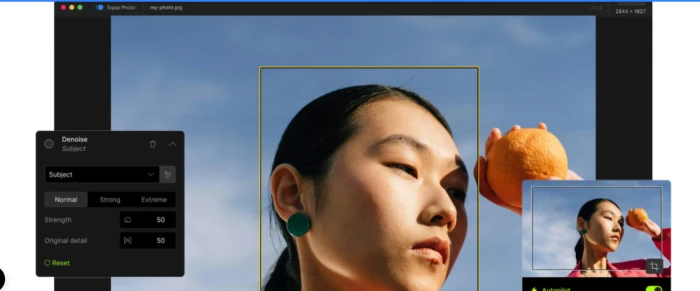
The specialist that makes low-resolution and noisy photos look pristine.
★★★★★ 4.7 / 5
Topaz Photo AI does a small number of jobs better than anything else: upscaling, noise reduction, sharpening and face recovery. Its Autopilot scans each image, detects the problems and applies the right models automatically, while Gigapixel-grade upscaling can enlarge images up to 16x with startlingly clean detail. It works standalone or as a plugin inside Photoshop and Lightroom.
The one big change to note: Topaz Labs retired its one-time perpetual licences in September 2025, so the product is now subscription-only. Existing owners keep what they bought.
Key features
• AI upscaling up to 6x–16x with dedicated models for faces, landscapes and low-res sources.
• Best-in-class noise reduction that preserves detail on high-ISO and night shots.
• Sharpening that corrects motion blur and soft focus.
• Autopilot auto-detects and fixes issues; full RAW support.
• Runs standalone or as a Photoshop / Lightroom plugin, with batch processing.
Pricing
| Plan | Price (USD) | What you get |
| Photo AI (annual) | ~$21/mo | Full Photo AI app; roughly $149–$199 billed yearly |
| Photo AI (monthly) | ~$25/mo | Same app, no annual commitment |
| Topaz Studio bundle | $69/mo ($34/mo annual) | All Topaz apps: Photo, Gigapixel, Video, Astra and more |
Pros Genuinely best-in-class upscaling and denoise Works inside Photoshop/Lightroom Great for restoring old or low-res photos | Cons No longer sold as a one-time purchase Narrow scope — not a full editor Heavy on GPU/CPU for large batches |
Best for: Photographers who need the cleanest possible upscaling, denoising and restoration.
3. Adobe Lightroom
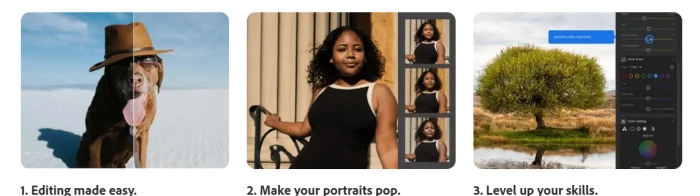
The photographer's darkroom, with AI baked into the sliders.
★★★★★ 4.6 / 5
Where Photoshop is about pixels, Lightroom is about the whole photographic workflow — importing, organising, developing and exporting hundreds or thousands of RAW files. Its AI features are subtle but time-saving: AI Denoise produces some of the cleanest high-ISO results available, Adaptive Presets and AI Masking automatically select skies, subjects and backgrounds, and Lens Blur simulates depth of field after the fact.
For colour grading, cataloguing and non-destructive RAW editing across a big library, it is the tool most pros reach for first.
Key features
• AI Denoise for exceptionally clean RAW noise reduction.
• AI Masking — automatic Select Sky, Select Subject and object detection.
• Adaptive presets and Generative Remove for erasing distractions.
• Cloud-based catalogue that syncs edits across desktop, web and mobile.
• Non-destructive editing with full edit history and one-click export presets.
Pricing
| Plan | Price (USD) | What you get |
| Lightroom (single app) | $11.99/mo | Lightroom + 1TB cloud storage across devices |
| Photography plan | $19.99/mo | Lightroom + Lightroom Classic + Photoshop + 1TB |
| Mobile app | Free | Core edits on iOS/Android; premium features need a plan |
Pros Superb RAW colour and tone control Best-in-class library management AI Denoise and masking save real time | Cons Not built for compositing or heavy retouching Subscription only Cloud storage fills up fast on 1TB |
Best for: Photographers who shoot in volume and want organisation, colour and RAW editing in one catalogue.
4. Luminar Neo
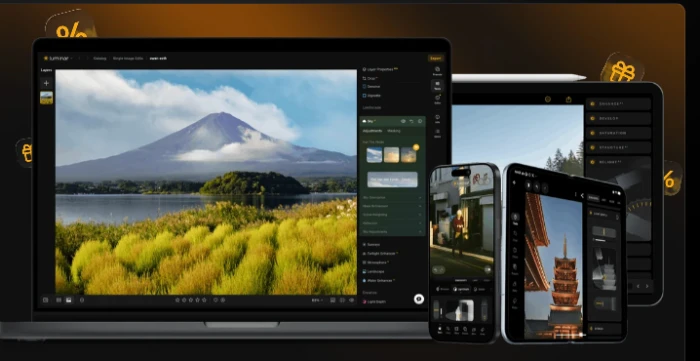
AI-first editing you can actually own with a one-time licence.
★★★★★ 4.5 / 5
Skylum's Luminar Neo is the strongest answer to subscription fatigue. It bundles genuinely impressive AI tools, Sky AI to swap skies, Relight AI to rebalance lighting, and portrait tools that reshape faces and enhance skin, behind a one-time perpetual licence rather than a monthly bill.
The catch worth knowing: 'lifetime' covers the version you buy plus bug fixes and some new features, but major generative tools (GenErase, GenExpand, GenSwap) are included for a year and big upgrades may cost extra. Even so, for hobbyists and landscape or portrait shooters it is superb value.
Key features
• Sky AI for realistic one-click sky replacement with matched reflections.
• Relight AI to rebalance foreground and background lighting independently.
• Portrait, Skin and Body AI for natural retouching.
• Generative Erase, Expand and Swap for prompt-style edits (1-year access).
• Works standalone or as a Photoshop / Lightroom Classic plugin.
Pricing
| Plan | Price (USD) | What you get |
| Desktop (perpetual) | $119 one-time | Luminar Neo on 2 computers (Win/Mac); AI + Pro tools |
| Cross-Device (perpetual) | $159 one-time | Adds the mobile app for iOS/Android |
| Max (perpetual) | $179 one-time | Adds Creative Library — presets, LUTs, skies, overlays |
| Subscription | from ~$14.95/mo | Rolling access with all updates included |
Pros One-time purchase option, no subscription needed Powerful, beginner-friendly AI tools Runs as a plugin for Photoshop/Lightroom | Cons Generative AI tools time-limited on perpetual licences Weaker cataloguing than Lightroom Can be demanding on older hardware |
Best for: Hobbyists and landscape/portrait photographers who want strong AI editing without a monthly bill.
5. Canva Magic Studio

The easiest way for non-designers to edit and create at once.
★★★★☆ 4.4 / 5
Canva is not a dedicated photo editor, but its Magic Studio suite has quietly become one of the most-used AI editing toolkits in the world because it is so accessible. Magic Eraser removes objects, Magic Expand extends a photo to a new aspect ratio, Background Remover works in a click, and Magic Edit swaps parts of an image from a text prompt, all inside the same drag-and-drop editor you use for social posts and presentations.
It shines for anyone who needs polished, on-brand visuals fast rather than pixel-perfect retouching.
Key features
• Magic Eraser, Magic Edit and Magic Grab for object removal and replacement.
• Background Remover and Magic Expand for one-click cut-outs and reframing.
• Dream Lab text-to-image generation and Magic Resize across formats.
• Brand Kit keeps every edit on-brand; 140M+ premium stock assets.
• Runs in any browser plus iOS/Android; real-time team collaboration.
Pricing
| Plan | Price (USD) | What you get |
| Free | $0 | Basic editing, limited monthly Magic Studio AI credits |
| Pro | ~$15/mo ($120–180/yr) | Full Magic Studio, 500 AI credits, Background Remover, 1TB |
| Business (per user) | ~$20–25/mo | Team brand controls, admin and higher limits |
| AI Pass add-on | ~$100/mo | Optional top-up for heavy AI credit users |
Pros Effortless for non-designers Editing + design + generation in one app Generous, genuinely useful free tier | Cons Not for advanced retouching or RAW AI credits deplete quickly on heavy use Generated images can be low-res by default |
Best for: Marketers, social creators and small businesses who want quick, on-brand edits without design skills.
6. Photoroom
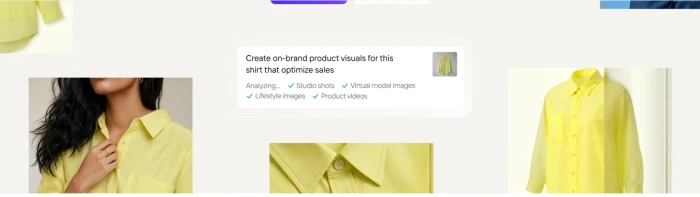
Purpose-built for product photos and high-volume e-commerce.
★★★★☆ 4.4 / 5
Photoroom is laser-focused on one job: making product images sell. It removes and replaces backgrounds with excellent edge detection, drops products into AI-generated studio scenes, adds realistic AI shadows, and processes hundreds of images in a batch. Native Shopify integration and an API make it a favourite for online sellers and catalogue teams.
If your work is lifestyle photography or heavy retouching it is the wrong tool, but for turning raw product shots into clean listings at scale, few things are faster.
Key features
• AI background removal with strong edge accuracy, even on hair and fabric.
• AI Backgrounds and Instant Shadows to place products in styled scenes.
• Batch processing for hundreds of images with consistent output.
• Shopify integration, white-background presets and an API for automation.
• Web, iOS and Android with the same core toolset.
Pricing
| Plan | Price (USD) | What you get |
| Free | $0 | Background removal and basic editing with limits |
| Pro | $12.99/mo | 500 batch exports, AI backgrounds, retouch, HD export |
| Max | $34.99/mo | 1,500 batch exports, Shopify integration, higher limits |
| Ultra | $99/mo | 5,000 batch exports and top-tier model access |
Pros Outstanding background removal Built for batch and e-commerce workflows Shopify + API automation | Cons Narrow focus, not a general editor Best features gated behind higher tiers Limited creative/artistic control |
Best for: E-commerce sellers and catalogue teams processing product photos in volume.
7. Picsart
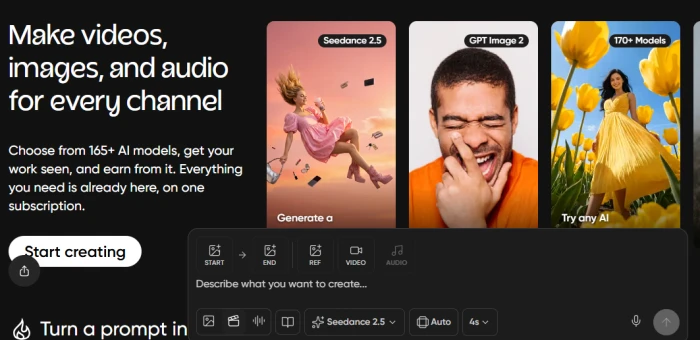
A mobile-first creative playground for social content.
★★★★☆ 4.2 / 5
Picsart grew up as a mobile photo editor and it still feels most at home on a phone. It packs a huge range of AI tools, AI Enhance to sharpen and upscale, AI Replace to swap objects or backgrounds from a prompt, AI-generated stickers and effects, alongside a big library of templates aimed at social media. A batch editor can apply the same look to up to 50 images at once.
Its generative tools run on a monthly credit system, so heavy users should watch their allowance.
Key features
• AI Enhance to upscale, deblur and improve resolution automatically.
• AI Replace and AI Expand for prompt-based object and background edits.
• One-tap background remover and huge sticker/effect library.
• Batch editor applies one style across up to 50 images.
• Strong template library for Instagram, TikTok and Stories.
Pricing
| Plan | Price (USD) | What you get |
| Free | $0 | Basic edits, 5 AI credits/week, watermarks on some assets |
| Pro | ~$5/mo annual (~$15 monthly) | 500 AI credits, all editing tools, no watermarks |
| Ultra | higher tier | 1,500 credits, larger batch processing, premium models |
Pros Enormous toolkit for social creators Excellent mobile apps Cheap on annual billing | Cons Credit limits on AI tools Interface can feel cluttered Output quality trails desktop pro tools |
Best for: Social media creators and mobile-first users who value speed and variety over precision.
8. Pixlr
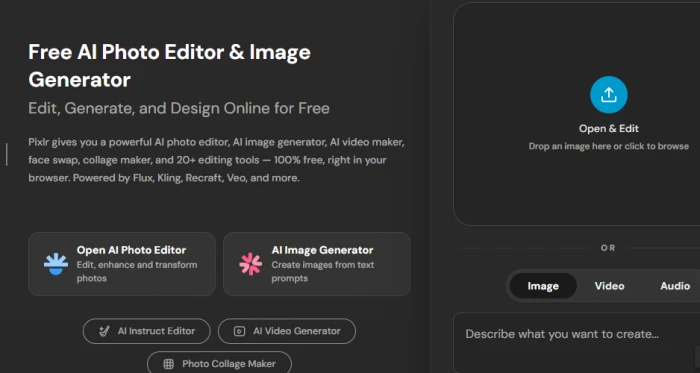
Fast, friendly, browser-based editing on a small budget.
★★★★☆ 4.1 / 5
Pixlr is the tool to reach for when you want to make a quick edit without installing anything. Pixlr E offers a surprisingly capable Photoshop-style editor in the browser, while Pixlr X is a simplified version for fast fixes. AI features include background removal, AI Generative Fill, an AI image generator and one-click enhancers, all wrapped in one of the cheapest paid plans in this guide.
It is not built for professional output, but for learning, experimentation and everyday edits it is excellent value.
Key features
• Browser-based editors (Pixlr E advanced, Pixlr X simple), no install.
• AI Generative Fill, AI image generator and AI expand.
• One-click background removal and AI enhance/upscale.
• Layers, masks and filters for Photoshop-style editing.
• Runs on any device with a browser, plus mobile apps.
Pricing
| Plan | Price (USD) | What you get |
| Free | $0 | Core editing with ads and limited AI credits |
| Plus | from ~$2.49/mo | 80 AI credits, ad-free, more tools (promo pricing) |
| Premium | ~$7.99/mo | Higher AI credits, full tool access, premium assets |
Pros Works in any browser, nothing to install Among the cheapest paid plans Good for learning layers and masks | Cons Credit-limited AI features Ads on the free tier Not suited to professional deliverables |
Best for: Casual users and students who want quick, affordable edits without downloading software.
9. Fotor
A budget all-rounder that automates the common fixes.
★★★★☆ 4.0 / 5
Fotor has been around since 2012 and today leans heavily on AI to automate the everyday jobs: one-click enhance, background removal, object removal, AI upscaling and an AI image generator, plus simple graphic-design templates. It is available on web, Windows, macOS, iOS and Android, and its paid plans undercut most competitors.
Quality is solid rather than spectacular, some edits look a touch cool or soft, but for casual users on a tight budget it covers a lot of ground cheaply.
Key features
• One-click AI Enhance, AI Upscaler and AI Denoise.
• AI background remover and object/blemish removal.
• AI image generator and AI portrait/headshot tools.
• Template-based graphic design for social and print.
• Web plus desktop and mobile apps.
Pricing
| Plan | Price (USD) | What you get |
| Free | $0 | Basic edits with watermarked exports and daily AI limits |
| Pro | $8.99–10.99/mo | ~100 AI credits, no watermark, full editing tools |
| Pro+ | $23.99/mo | 300 credits, batch editing and brand kits |
| Max | $49.99/mo | 1,000 credits for high-volume users |
Pros Very affordable entry price Covers most common edits in one place Cross-platform, including desktop apps | Cons Output quality is mid-tier Free tier watermarks exports Credit caps on AI tools |
Best for: Budget-conscious casual users who want a bit of everything without paying premium prices.
10. Photopea
A free, Photoshop-compatible editor that runs in your browser.
★★★★☆ 4.0 / 5
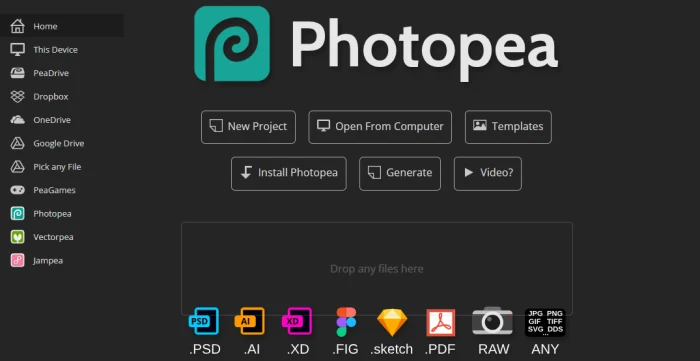
Photopea is a small miracle: a browser-based editor that looks and behaves remarkably like Photoshop, opens and saves PSD files, and costs nothing. It supports layers, masks, adjustment layers, smart objects and even opens Sketch and XD files. Its AI features are lighter than the paid tools here, background removal and basic generative helpers, but for editing existing PSDs or doing layered work for free, it is unbeatable.
The only cost is on-screen ads, which a cheap Premium plan removes.
Key features
• Opens and saves PSD, plus AI, XD, Sketch and Figma files.
• Full layers, masks, adjustment layers and smart objects.
• Background removal and basic AI-assisted tools.
• Works entirely in the browser, nothing to install, on any OS.
• Familiar interface for anyone who has used Photoshop.
Pricing
| Plan | Price (USD) | What you get |
| Free | $0 | Full editor with on-screen ads and standard history states |
| Premium | $5/mo (~$40/yr) | Ad-free, more undo history states, priority features |
Pros Genuinely free and PSD-compatible Full layer-based editing in a browser No installation on any device | Cons Lighter AI than paid rivals Ads on the free tier No cloud sync or team features |
Best for: Anyone who needs free, layer-based, Photoshop-style editing or has to open PSD files without Adobe.
Pricing compared: what you pay to get started
Entry prices vary widely, from free browser tools to premium specialist suites. The chart below compares the cheapest paid plan for each subscription tool so you can see the range at a glance.
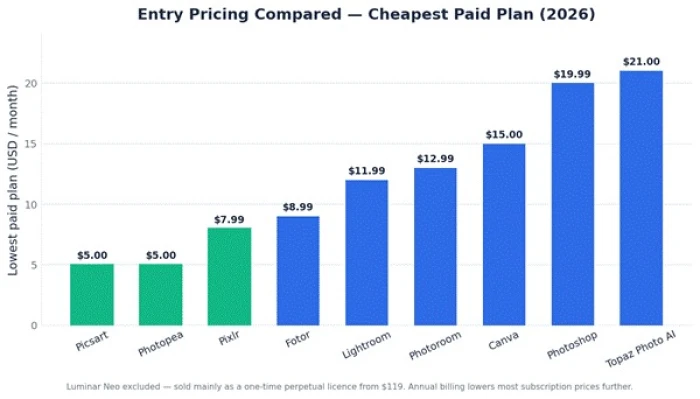
Figure 2 — Cheapest paid plan per tool, in USD per month (annual billing lowers several further).
How to choose the right AI photo editor
The best tool depends far less on which has the longest feature list and far more on the job in front of you. Use these quick rules:
• Professional retouching or compositing? Adobe Photoshop, backed by Lightroom for RAW and library work.
• Upscaling, denoising or restoring old photos? Topaz Photo AI is in a class of its own.
• Hate subscriptions? Luminar Neo's one-time licence, or the free Photopea, are your friends.
• E-commerce product shots at volume? Photoroom, for batch background work and Shopify integration.
• Social content and quick, on-brand visuals? Canva Magic Studio or Picsart.
• Tight budget or just experimenting? Start free with Pixlr, Fotor or Photopea and upgrade only if you hit a wall.
A practical tip Almost every paid tool here offers a free trial or free tier. Shortlist two picks that match your workflow, run the same three or four real images through each, and let the output, not the marketing, decide. Also check the renewal price, not just the introductory one. |
The verdict
AI has made powerful photo editing accessible to everyone, but the right choice still comes down to fit. Adobe Photoshop and Lightroom remain the professional benchmark; Topaz Photo AI is the specialist for pristine upscaling and restoration; Luminar Neo is the standout for those who want to own their software; and Canva, Photoroom, Picsart, Pixlr, Fotor and Photopea each own a corner of the market, social, e-commerce, mobile, budget and free.
Start with a free trial, test your own images, and pick the tool whose results, and price fit the work you actually do. The best AI photo editor is simply the one that gets your job done fastest for the least money.