For most of the last three years, choosing an AI assistant was a one-and-done decision. You picked a tool, learned its quirks, and settled in. That era is over. In 2026, switching between AI assistants has become culturally normal and operationally easy, so much so that a majority of paying users now treat cancelling and re-subscribing as their default way of managing tools.
This article breaks down why people jump from one assistant to another using the latest market data and turns it into a practical framework you can actually use, whether you’re a solo user deciding where your $20 a month should go or a team lead choosing a default tool for fifty people.
The one-sentence version People used to switch AI assistants because one was clearly smarter. Today they switch for four very different reasons, trust and values, fit-for-task, cost, and friction and increasingly they don’t switch at all. They just keep two or three assistants open at once. |
The Big Picture: Switching Went Mainstream
The clearest proof that switching is now normal came in mid-2026, when analytics firm Sensor Tower reported that ChatGPT’s share of the AI assistant market slipped below 50% for the first time since its 2022 launch, landing at 46.4% at the end of May. It is still the most-used assistant on earth, with over 1.1 billion monthly users, but the category is no longer a one-horse race.
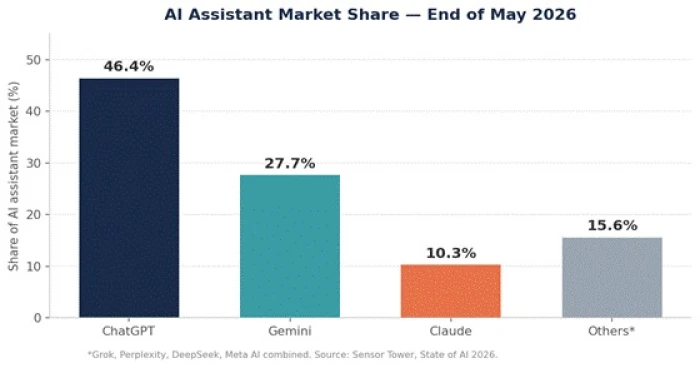
Figure 1 — ChatGPT still leads, but Gemini and Claude have carved out real share.
Two things are happening at once. Google’s Gemini is riding distribution, it’s baked into Android, Search, Gmail, and Workspace, so hundreds of millions of people use it without ever choosing to. Anthropic’s Claude took the opposite path: it grew on reputation for reasoning, writing, and coding, plus a trust story around how the company handles data and governance.
Here’s how the three leaders stacked up in monthly users:
| Assistant | Monthly users (May 2026) | Market share | What’s driving it |
| ChatGPT | ~1.1 billion | 46.4% | Brand recognition, broadest feature set |
| Gemini | 662 million | 27.7% | Default status across Google products |
| Claude | 245 million | 10.3% | Productivity, coding, writing, trust |
| Others* | Combined | under 5% | Grok, Perplexity, DeepSeek, Meta AI |
Table 1 — The top three assistants command roughly 89% of all time spent in AI apps. Source: Sensor Tower, State of AI 2026.
The growth story that scared everyone
The single most striking number of 2026 was Claude’s trajectory. It went from about 60 million monthly users in December 2025 to 245 million by May 2026 roughly a 4x jump in five months, the fastest growth of any major assistant. In India specifically, Claude climbed from 13.3 million monthly users in December to 72.3 million by May.
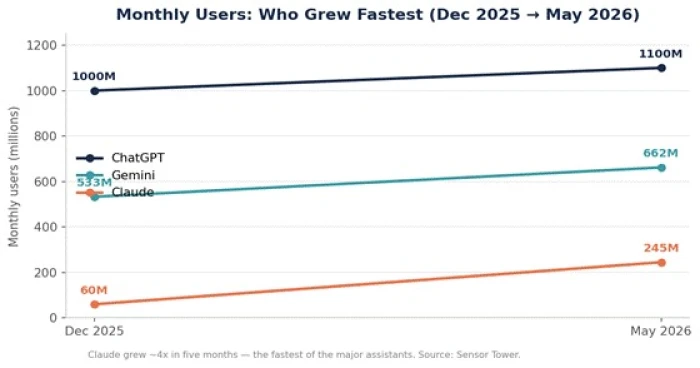
Figure 2 — Claude’s five-month climb is the sharpest line in the category.
But raw growth isn’t the interesting part, spikes happen. The interesting part is retention. Sensor Tower found that Claude’s share of churned users in the U.S. dropped steadily after March, pulling close to ChatGPT’s retention levels. Translation: people weren’t just trying the new thing, they were staying. That is the signal that a switch is real rather than a fad.
Why People Actually Switch
Dig past the headlines and the reasons people give for switching cluster into four buckets. Understanding which bucket you’re in is the whole game, it tells you whether switching will actually help.
| Driver | What it sounds like | How strong it is |
| Trust & values | “I don’t like what this company just did with my data / who they partnered with.” | Rising fast |
| Fit for the task | “This one is just better at my kind of work, coding, writing, research.” | Strongest for pros |
| Cost | “The price went up, or I’m paying for overlap I don’t use.” | Very common |
| Friction & habit | “It’s already built into the tools I use, so I just use that one.” | Quiet but powerful |
Table 2 — The four switching drivers, roughly in order of how much they’re shaping 2026 behavior.
Driver 1: Trust and values (the new tiebreaker)
The most important shift in 2026 is that brand trust and values alignment now move users, not just features. The clearest example: when OpenAI signed a deal with the U.S. Department of Defense in February, Sensor Tower recorded a measurable spike in ChatGPT uninstalls. People voted with their thumbs.
The framing that captures this: AI assistants are becoming infrastructure, like a bank or an email provider. And once something is infrastructure, you start caring about its governance, its data portability, and whether it will still behave predictably in a year, not just whether the UI looks nice today.
Driver 2: Fit for the task
The question has quietly changed from “which AI is best?” to “which AI is best for this?” Different assistants have earned different reputations, and heavy users switch to match the tool to the job:
• Coding & long, technical, or ambiguous tasks: Claude has built its reputation here, favored by developers who value reasoning depth over autocomplete speed.
• Live research & fact-checking: Perplexity and search-grounded tools win because they show their sources instead of asserting confidently.
• Everyday breadth & ecosystem: ChatGPT for the widest feature set; Gemini when your work already lives in Google or Copilot when it lives in Microsoft 365.
Driver 3: Cost and subscription fatigue
This is where switching gets emotional. A Bango survey of 2,000 U.S. AI users found the average American AI subscriber pays for four premium AI tools totaling about $66 a month, 24% spend over $100 a month, and 14% pay for eight or more AI services. Because no single tool does everything, the costs stack linearly, and separate research found 51% of users have cancelled a subscription specifically because of rising prices.
Driver 4: Friction and default behavior
The quietest driver is the strongest for the mass market: people use whatever is already there. When an assistant is the operating-system default (Gemini on Android) or embedded in the apps you live in (Copilot in Word, Excel, and Outlook), users don’t compare it to alternatives, they just use it. This is also why teams get locked in: convenience today becomes ecosystem lock-in tomorrow.
The Plot Twist: Most People Don’t Switch, They Rotate
Here’s the finding that reframes the entire conversation. The dominant behavior in 2026 isn’t clean switching (leave A, join B). It’s rotation. In the same Bango survey, 53% of American AI subscribers said they cancel and restart AI tools as needed, churn has become the default management strategy, not the exception.
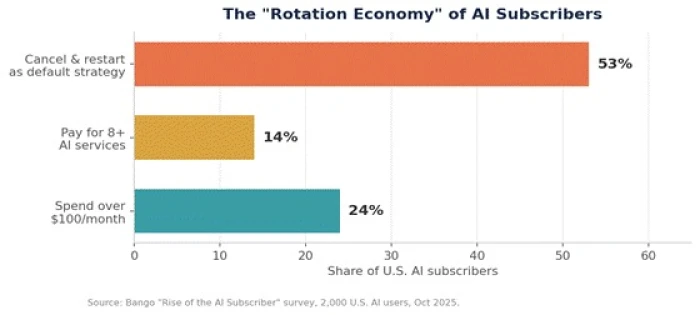
Figure 3 — Over half of paying AI users treat cancelling and restarting as normal maintenance.
The pattern looks like this: use Claude heavily for a month of coding, cancel; switch to ChatGPT for a month of research, cancel; repeat. It’s the same subscription fatigue that hit streaming, Netflix, Disney+, Hulu now applied to AI tools. Each one feels “worth it” for one or two use cases, but the combined bill delivers far less than its price because you can only use one at a time.
Why this matters for you If you’re frustrated with your AI assistant, the honest first question isn’t “which one should I switch to?” It’s “am I about to add cost and overlap, or genuinely replace something?” Rotation is a feature when it’s deliberate and a money pit when it’s reflexive. |
The Practical Playbook
Enough analysis. Here’s how to make a good decision, and avoid paying for four tools that each do 80% of the same thing.
Step 1: Diagnose before you switch
Run through this quick self-check before touching a “cancel” button:
1. Name the real problem. Is it quality, price, trust, or friction? Each points to a different fix, and only some are fixed by switching.
2. Check the two-uses rule. If you haven’t used a paid tool at least twice a week, cancel it, don’t switch it.
3. Find the overlap. If two tools both draft copy or both write code, consolidate onto the one you trust most.
4. Test before you commit. Run your actual work, your real prompts, your real files through a free tier for a week before moving your subscription.
Step 2: Match the tool to the job
If your switch is genuinely about fit, this table is the shortcut:
| Your main use | Reach for | Why |
| Coding, debugging, refactoring | Claude / coding agents | Reasoning depth on long, multi-file tasks |
| Live research, fact-checking | Perplexity | Cites live sources instead of asserting |
| General everyday use | ChatGPT | Broadest features and integrations |
| Work inside Google apps | Gemini | Native in Gmail, Docs, Search |
| Work inside Microsoft 365 | Copilot | Grounded in your Office files & Teams |
| Writing with saved context | Tools with strong memory | Stops you re-explaining yourself weekly |
Table 3 — A fast use-case-to-tool map. Most people need at most two of these, not five.
Step 3: Weigh the switching costs people forget
Switching is cheaper than it used to be, but it’s never free. Before you move, price in:
• Relearning friction — every tool has quirks, and productivity dips while you adapt.
• Lost memory & history — saved context, custom instructions, and past chats rarely move with you.
• Prompt rework — the prompts you’ve tuned for one model may need reworking for another.
• Ecosystem entanglement — the more a tool is wired into your other apps, the higher the real cost of leaving.
A simple rule of thumb Switch for trust or fit, those are structural and worth the friction. Rotate for cost, but only deliberately. And never switch out of novelty alone: the METR data is a useful reminder that new tools can even slow you down on complex work while you climb the learning curve. |
How to Test a New AI Assistant Before You Switch
Testing is where many switching decisions go wrong.
If you write professionally, use an actual brief.
Even if you code, give both assistants the same debugging problem.
If you analyze documents, upload the same type of file.
When research matters, ask the same current question and examine both the answer and the quality of the supporting sources.
Then compare what actually affects your work.
| What to compare | What to look for |
| Answer quality | Accuracy, depth, reasoning and usefulness |
| Reliability | How often responses need correction or regeneration |
| Context handling | Whether long instructions and files are followed consistently |
| Research quality | Freshness, traceability and quality of sources |
| Workflow fit | How naturally it works with your existing tools |
| Speed to usable output | How quickly you reach a finished result, not simply response speed |
| Cost | Whether the improvement justifies the subscription |
The best assistant isn't necessarily the one that gives the most impressive first response.
It is the one that repeatedly gets you to a usable final result with less effort.
That distinction matters.
A model that produces a beautiful answer but requires repeated correction may be less valuable than one whose first response is less flashy but consistently usable.
The safest approach is therefore to test assistants side by side for a period before fully moving your workflow.
Don't switch because another AI wins one prompt. Switch when it consistently performs better on the work you actually do.
What Happens to Your Data When You Switch?
There is another switching cost that receives much less attention:
your accumulated context.
Cancelling a subscription can take seconds.
Rebuilding months of context can take considerably longer.
Over time, an AI assistant may accumulate conversation history, saved preferences, custom instructions, uploaded files, project contextreusable prompts,
custom assistants, and connections to other applications.
Even when a platform allows data export, exporting information isn't the same as transferring the experience.
Your new assistant may not understand that information in the same way or automatically recreate the system you've built around the previous tool.
For an individual user, this can mean repeatedly re-explaining preferences and workflows.
For a team, the cost can be significantly larger because internal instructions, shared knowledge, integrations and standardized processes may depend on one platform.
Before leaving an assistant, check what would actually move with you:
- Conversation and project history
- Saved memory or preferences
- Custom instructions
- Reusable assistants or agents
- Uploaded knowledge and reference files
- Connected apps and integrations
- Team workspaces
- Shared workflows
- Privacy and retention settings
- This changes what "switching cost" means.
It is no longer mainly about learning where the buttons are.
Increasingly, the bigger issue is context portability.
The more useful an assistant becomes because it knows your preferences, files and workflow, the more valuable portability becomes.
That creates an interesting tension for AI companies.
Better memory makes assistants more useful.
But it can also make users more reluctant to leave.
When You Shouldn't Switch AI Assistants
Not every bad response is a reason to move to another AI assistant. These tools change quickly, with models being updated, features shifting and performance improving or weakening across different types of tasks. A few disappointing responses may simply reflect a temporary limitation rather than a fundamental problem with the platform.
There is also a strong novelty effect when trying a new assistant. Different wording can feel more intelligent, a new interface can seem faster and an unfamiliar reasoning style can make the product appear dramatically better. That first impression is useful, but it can also be misleading. After several weeks of regular use, the gap between two assistants may turn out to be much smaller than it initially seemed.
Staying with your current assistant often makes more sense when it already performs your recurring tasks reliably, fits naturally into your workflow and the alternative offers only a marginal improvement. Switching becomes less attractive when the benefit is mostly cosmetic rather than something that consistently improves the way you work.
Constant switching also creates its own productivity cost. Every new AI assistant requires time to understand how it interprets instructions, how much context it needs, where it tends to struggle, how its memory and file handling work and which prompting patterns produce dependable results. Those differences may seem small individually, but together they create another learning curve.
If you repeatedly restart that learning process, the time spent comparing, testing and adapting to new AI tools can eventually exceed the time they are supposed to save. This is especially true for users who have already built effective prompts, workflows, saved context or integrations around their current assistant.
A useful threshold is to switch only when the difference is structural rather than cosmetic. If another assistant is consistently better for the work you perform most often, materially cheaper, more aligned with your privacy expectations or significantly easier to integrate into your existing workflow, changing platforms can make sense.
If the attraction is mainly a new interface, different wording, temporary hype or a single viral benchmark, staying with the tool you already understand may be the more rational decision. The goal should not be to constantly use the newest AI assistant, but to use the one that continues to produce reliable results with the least overall friction.
What This Means Going Forward
The takeaway isn’t which logo is on top. It’s that the whole relationship between people and AI tools has changed. Assistants have crossed from “interesting chatbot” to “multi-surface operating layer,” and users have responded by becoming promiscuous on purpose, keeping several assistants, using each for what it’s best at, and feeling zero loyalty to any single brand.
For companies, that raises the bar: features alone no longer retain anyone, because features get copied within months. What retains people now is trust, memory that actually persists, and fit for real workflows. For you as a user, the power has never been greater, switching costs are low, free tiers are generous, and the tools are competing hard for your attention.
So the smartest move in 2026 isn’t picking the “winner.” It’s being intentional: know your main job, pick the one or two tools that fit it, watch the trust signals, and audit your subscriptions every quarter so rotation stays a choice instead of a leak.