Here is the test I use on friends who swear they can always tell a fake download site. I ask them to search "GTA 6 PC download" and pick the safest-looking result. Most of them pick something. The correct answer is none of them, because Rockstar has confirmed Grand Theft Auto VI for November 19, 2026 on PS5 and Xbox Series X|S only, with no PC date announced. Every page offering a PC copy today is lying, no matter how polished it looks.
I spend a large part of my working week judging websites: who owns them, how old they are, what they link to and whether they deserve trust. That habit follows me home. When my cousins or my friends' kids ask where to get a game, I don't give them a list of "good sites." I give them a way of looking at any site. That is what this guide is.
You'll get the green flags I look for, the red flags that make me close a tab instantly, a side-by-side comparison, the exact five-minute routine I run, and what I do if someone has already clicked the wrong thing.
The numbers that made me write this 19,038,175 attempts to spread malicious or unwanted files disguised as popular games, April 2024 to March 2025 (Kaspersky) 408,550 unique users targeted in that period 93% of those attempts were "downloaders," small programs that quietly fetch more malware after you run them 4,456,499 attempts used Grand Theft Auto alone as the bait |
Why game downloads are such an easy trap?
Attackers go where the searches are. Kaspersky's researchers took 20 of the most popular games among younger players, used their names as keywords, and counted how often files carrying those names turned out to be malicious or unwanted. The same handful of titles stayed on top for the entire year, and the reason is simple: they have huge modding communities, which means millions of people routinely download files from places that aren't the official store.

Figure 1. GTA and Minecraft together account for more than 8.5 million attack attempts.
Even in India, where I'm based, the same report counted 4,053 unique users hit by malicious files dressed up as popular games. That sounds small next to the global total until you remember it only counts people running one vendor's security software.
What's inside the fake file?
This is the part most people get wrong. They picture a fake game as a broken game. In reality, the file you download usually isn't the payload. It's a delivery van.
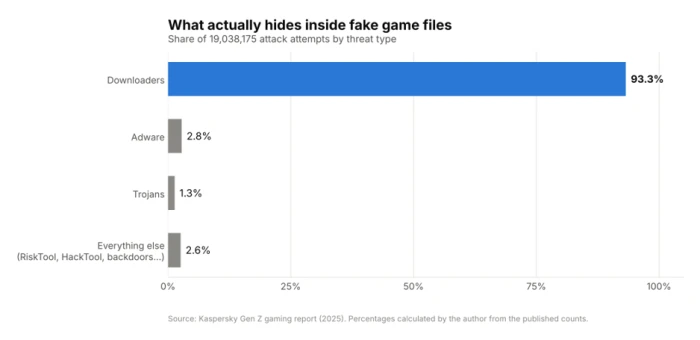
Figure 2. Downloaders dominate. Adware and trojans make up most of what remains.
A downloader looks harmless when scanned because it carries almost nothing. Once you run it, it reaches out and pulls in the real damage: spyware, keyloggers, adware or a password stealer. Kaspersky's team traced one family, the Hexon stealer and its rebrand Leet, spreading through fake game installers shared on gaming forums and Discord, often hosted on MediaFire. It specifically hunted for Steam, Roblox, Minecraft, Epic Games and Discord data. The newer Leet version even checks whether it's running inside a security researcher's virtual machine and stays quiet if it is.
So the question is never "will this game run?" It's "what else will run when I double-click?"
What a safe game download site looks like?
Safe sites are boring, and I mean that as a compliment. They don't need to convince you of anything. These are the green flags I expect to see before I download a single byte.
| Green flag | What I look for | Why it matters |
|---|---|---|
| Official ownership | The store or the publisher's own domain (steampowered.com, epicgames.com, gog.com, rockstargames.com) | Someone accountable signs and hosts the file |
| One obvious download path | A single button, or a launcher that handles the download for you | No guessing which button is real |
| A real business behind it | Company name, physical address, support contact, privacy policy, refund policy | Scam pages rarely bother with legal pages that hold up |
| Signed installers | Right-click the file, Properties, Digital Signatures shows the real publisher | Unsigned "official" installers are a contradiction |
| Sensible file sizes | A launcher stub of a few MB from the official domain, or a full game in the expected size range | A 4 MB "full game" from a random site is a downloader |
| Visible reviews and history | Years of reviews, patch notes, an active forum and a public developer profile | Brand-new pages with no history are where trouble hides |
| Payment through known processors | Store checkout, PayPal, UPI or cards through a recognised gateway | Gift-card-only or crypto-only payment is a classic scam pattern |
The red flags I check first
I don't treat every warning sign equally. Some are mild annoyances that a legitimate but cheap site might have. Others are so strongly tied to malware that one sighting ends the visit. Here they are, roughly in the order I notice them.
1. The domain doesn't match the brand
Page design is free to copy. A scammer can clone the Steam layout pixel for pixel in an afternoon. The domain is the one thing they can't copy, so that's where I look first, and I read it slowly from right to left, because the real domain is the part just before the ending (.com, .net and so on).

Figure 3. The four lookalike tricks I run into most. The sketchy examples are invented for illustration.
Watch for letter swaps ("rn" pretending to be "m"), a brand name used as a prefix on someone else's domain, throwaway endings like .xyz, and the real brand tucked inside a longer address like minecraft.net.something-else.top. In that last case the site you're actually on is "something-else.top."
2. The offer is impossible
An unreleased game. A full premium title free with no strings. A PC version of a console exclusive. "Early access" builds nobody has announced. These offers exist only to get a click. I use GTA VI as my standing example: until Rockstar announces a PC release, any "GTA 6 PC download" page is fake, full stop. Kaspersky's own report warned that the GTA VI launch would likely bring a wave of fake installers and beta invites, and November 2026 is exactly that window.
3. A page full of download buttons
When I land on a page with four green "Download" buttons, a flashing "Fast Download" banner, a countdown timer and an "Allow notifications" prompt, I know the site makes its money from ads that impersonate the real link. Clicking the wrong one sends you to a different domain, often one serving a "download manager" that is itself the threat. A safe site gives you one clear button. Two at most, for different platforms.
4. It wants your gaming login
No legitimate download requires you to type your Steam or Epic password into a third-party website. Kaspersky documented fake Valorant giveaways, fake Call of Duty bonus pages, fake Fortnite reward pages and fake Counter-Strike 2 skin sites that all ended the same way: a login form that sends your credentials straight to the attacker. Logins happen inside the official launcher or on the official domain. Nowhere else.
5. It tells you to switch off your antivirus
This one is an instant exit for me. Pirate sites often explain that the antivirus will produce a "false positive" on the crack, so you should disable it or add an exclusion. Sometimes that's even true. It's also exactly what a malware author would say. I'm not willing to bet my saved passwords on which case I'm in.
6. The file arrives locked or tiny
A password-protected ZIP or RAR, with the password printed on the download page, is a deliberate trick. Your antivirus can't look inside an encrypted archive, so the scan comes back clean. Pair that with a tiny .exe that claims to be an 80 GB game and you're looking at a downloader.
7. Nobody is accountable
No company name. No address. A contact form that goes nowhere. A domain registered a few weeks ago through a privacy service. On its own, this isn't proof of anything; plenty of small indie sites are thin on legal pages. Combined with any flag above, it seals the decision.
8. The comments are too happy
Fifty comments that all say "Works perfectly, thanks admin!" in slightly different words, posted the same week, with no complaints at all. Real communities complain. A comment section with zero friction is usually written by the site owner.

Figure 4. My personal weighting. Anything scoring 9 or 10 ends the visit on its own.
Safe site vs sketchy site: side by side
When I'm explaining this to someone younger, a side-by-side table works better than any lecture. Print it, screenshot it, stick it near the family PC.
| Checkpoint | Safe site | Sketchy site |
|---|---|---|
| Domain | Official brand domain, spelled correctly | Lookalike spelling or an odd ending like .xyz, sometimes with the brand buried inside a longer address |
| HTTPS padlock | Present | Usually present too, so it proves nothing on its own |
| Price | Normal prices and real sales; free-to-play titles are free for real | Premium games free, unreleased games available, cracked DLC included, "full version unlocked" |
| Download button | One clear button or a launcher | Several fake buttons, countdown timers, redirect chains, surprise new tabs |
| Pop-ups | None, or a cookie notice | "Allow notifications to continue" prompts and fake virus alerts |
| Login requests | Only inside the official launcher or domain | Asks for Steam, Epic or Discord login on its own page |
| File you receive | Signed installer or launcher from the publisher | Password-protected archive, tiny .exe, .scr, .bat or double extensions |
| Security instructions | None needed | "Disable your antivirus, it's a false positive" |
| Company details | Legal name, address, support, refund policy | Missing, vague, or copied from another site |
| Community signal | Years of reviews with mixed opinions and real patch notes | Identical praise comments, no history |
A word about the padlock The HTTPS padlock means the connection between you and the site is encrypted. It says nothing about who runs the site or whether they're honest. Certificates are free and automatic now, so scam sites have them as a matter of course. I treat a missing padlock as a red flag and a present padlock as no information at all. |
My 5-minute vetting routine
When a site isn't one of the big official stores, this is the exact order I work in. It takes about five minutes the first time and less once it becomes habit.

Figure 5. Each step is cheap. Stop at the first failure.
1. Ask whether you even need this site. If the game is on Steam, Epic, GOG, the Microsoft Store, a console store or the publisher's own website, get it there. The routine below is only for when you can't.
2. Check the domain. Read it right to left. Then look it up on ICANN Lookup to see when it was registered. A domain created last month promising a decade-old game library is a mismatch.
3. Run two reputation checks. Paste the address into Google Safe Browsing's site status tool and into the URL tab on VirusTotal. VirusTotal runs the address past dozens of security engines at once. A single detection is enough for me to stop.
4. Watch how the page behaves. Does it open new tabs, ask for notification permission, show a fake virus alert, or push you toward a "download manager"? Does it want a login? Any of those ends the check.
5. Scan the file before opening it. Upload it to VirusTotal (or, for big files, check its hash there). Confirm the file type and size make sense for what you asked for. Right-click, Properties, Digital Signatures to see who signed it.
The free tools I use
| Tool | What it tells me | Where |
|---|---|---|
| ICANN Lookup | When the domain was registered and whether its owner details are hidden | lookup.icann.org |
| Google Safe Browsing status | Whether Google currently flags the site as unsafe | transparencyreport.google.com |
| VirusTotal | URL and file verdicts from many antivirus engines at once | virustotal.com |
| SteamDB | Update history of a Steam game, useful for spotting sudden suspicious builds | steamdb.info |
| Windows file Properties | Whether an installer is digitally signed, and by whom | Right-click the file, Properties, Digital Signatures |
Even official stores aren't bulletproof
I'd be giving you a false sense of safety if I said "just use Steam" and stopped there. Official stores are by far the safest option, but 2025 showed they can be fooled, usually by small, new games from unknown developers.
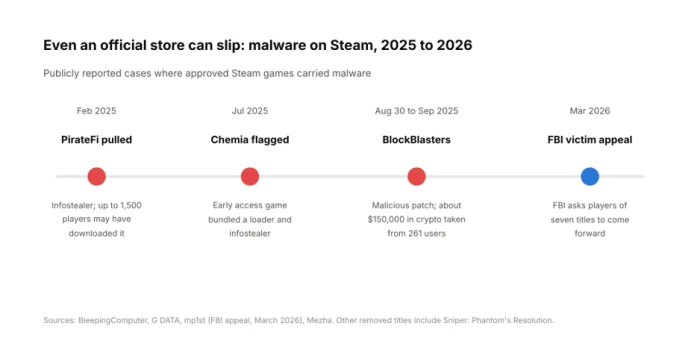
Figure 6. Each incident involved a small title, not a major release.
PirateFi was live for about a week in February 2025 and carried the Vidar infostealer. Up to 1,500 people may have downloaded it. Steam told players to scan their PCs and consider reinstalling Windows.
Chemia, an early access survival game, was injected with a loader that pulled in the Vidar stealer and a second custom stealer that went after credentials, browser data, cookies and crypto wallets.
BlockBlasters launched clean, then on August 30, 2025 shipped a patch containing malicious files. A streamer raising money for cancer treatment lost $32,000 live on air, and blockchain investigator ZachXBT traced about $150,000 stolen from 261 users.
In March 2026 the FBI opened an appeal for victims of seven titles, including BlockBlasters, Chemia, PirateFi, Lampy, Lunara, Tokenova and Dashverse/DashFPS.
Keep perspective: Steam hosts well over 100,000 games, and these cases were a tiny fraction. What I took from them is a narrower rule. On any store, I'm extra careful with free, brand-new games from developers with no history, especially anything themed around crypto, and I check SteamDB if a small game suddenly ships an odd update. The BlockBlasters case is the one that changed my habits, because the game was fine on day one and turned malicious a month later.
Checking the file itself
Once something is on your drive, the file still has a story to tell. Here's how I read it before I double-click.
| What you see | Normal when | Red flag when |
|---|---|---|
| Small .exe (under 10 MB) | It's the official launcher or web installer from the official domain | A third-party site says it's the full game |
| Large archive (.zip, .rar, .7z) | It matches the game's known install size and opens normally | It's password-protected and the password is on the download page |
| .scr, .bat, .cmd, .vbs, .js, .lnk | Almost never, for a game download | Always. These run code directly |
| Double extension like setup.zip.exe | Never | Always. Turn on "File name extensions" in File Explorer so you can see them |
| .apk on Android | Downloaded from Google Play or a known developer's own page | From a "mod APK" site promising unlimited coins or unlocked items |
| SmartScreen "Windows protected your PC" | A tiny indie developer without a signing certificate, from a source you trust | Anything from a site you found five minutes ago |
Mods, cracks and cheats: the grey zone
Mods are where most careful gamers get caught, because modding is legitimate and fun, and the line between a mod hub and a malware page can be thin. Kaspersky specifically called out Minecraft players hunting for hacked clients and shader packs as easy targets, and GTA's open-world modding as the reason a 2013 game still tops the list.
My rule is to stick to the established hubs: Nexus Mods, CurseForge, Modrinth and the Steam Workshop. They host files with download counts, comment threads, version history and moderation. Even these aren't perfect; in 2023 a malware strain called Fractureiser got into a number of Minecraft mods on CurseForge before it was caught. That's why I also prefer mods that have been around for a while and have an active author, rather than whatever uploaded yesterday.
Cracks and cheats are a different story. I don't use them, and I don't recommend them to anyone. Cheats need deep access to your system to work, and cracks come from people with no accountability. Both are exactly the bait attackers use. Beyond the malware risk, piracy breaks the law in most countries and cheats can get your account banned. There's no version of this where the person downloading comes out ahead.
Where I actually get my games?
Plenty of excellent games cost nothing, legally and safely. Before going near a sketchy site, check these.
| Platform | Best for | Legit free option |
|---|---|---|
| Steam | The biggest PC catalogue, frequent sales | Free-to-play titles and demos |
| Epic Games Store | PC games, regular giveaways | Free games handed out on a rotating basis |
| GOG | Classic and DRM-free PC games | Occasional giveaways and free classics |
| itch.io | Indie and experimental games | Thousands of free and pay-what-you-want titles |
| Microsoft Store / Xbox app | PC Game Pass and Xbox titles | Free-to-play titles |
| PlayStation Store / Nintendo eShop | Console games | Free-to-play titles and demos |
| Google Play / Apple App Store | Mobile games | Most mobile games are free to download |
| Publisher launchers (EA app, Ubisoft Connect, Battle.net) | That publisher's own games | Free weekends and free-to-play titles |
What I do if someone already ran something sketchy?
It happens. A nephew installs a "Roblox FPS unlocker" from a Discord link, or you realise the archive you opened yesterday came from a domain that's now flagged. Speed matters more than perfection here, because stealers send their haul within minutes.
1. Disconnect the PC from the internet to stop any further downloads or data being sent.
2. From a different, clean device, change your passwords, starting with email, then Steam, Epic, Discord and banking. Your email comes first because it can reset everything else.
3. Sign out of all sessions. Steam's "Deauthorize all other devices" and Discord's session list both let you kick out anyone using stolen cookies, which a password change alone may not stop.
4. Turn on two-factor authentication everywhere it's offered, using an authenticator app rather than SMS where you can.
5. Move any crypto from wallets that were on that machine to a fresh wallet created on a clean device.
6. Run a full scan with an up-to-date security tool, then a second opinion scanner.
7. If a stealer was involved, reinstall Windows. That's what Steam advised PirateFi players to consider, and it's the only way I fully trust a machine again.
Frequently asked questions
Is it safe to download games from third-party websites?
Authorised resellers and established platforms like GOG, itch.io, Humble and Fanatical are fine. Random sites that offer paid games for free are not. Kaspersky's data shows the overwhelming majority of game-themed threats arrive as downloaders hidden inside exactly those files, so if a site isn't an official store or a known reseller, assume it's unsafe until you've checked it.
How can I quickly check if a game download site is legit?
Start with the domain: check its spelling and look up its registration date on ICANN Lookup. Then run it through Google Safe Browsing and VirusTotal. If it passes all of that and the page has one clear download button and no login request, it's probably fine. If it fails any one of them, leave.
Does the HTTPS padlock mean a site is safe?
No. The padlock only means the connection is encrypted. Scam and malware sites get certificates for free like everyone else, so the padlock tells you nothing about whether the person running the site is trustworthy.
Is there a real GTA 6 PC download?
Not as of October 2026. Rockstar's confirmed release is November 19, 2026 on PS5 and Xbox Series X|S, and no PC date has been announced. Any site offering a PC version right now is fake and almost certainly carrying malware.
Can games on Steam contain malware?
Rarely, but yes. PirateFi, Chemia, BlockBlasters and Sniper: Phantom's Resolution were all Steam games pulled for malware in 2025. The risk concentrates in small, free, brand-new games from unknown developers, so be more cautious with those than with established titles.